
In this article
Being in the ISP world I see the home router and network cause a majority of the problems blamed on the ISP. Most home networks put the router, switch, firewall, and Wi-Fi radios into one do-it-all box. This can be underpowered in terms of both processing power and Wi-Fi signal strength. In this post, I am going to go through the exercise of using Alta Labs equipment throughout your home network.
If you are already familiar with Alta equipment, you can skip to the end to see what hardware I would recommend for a medium house of say 4000-6000 square feet.
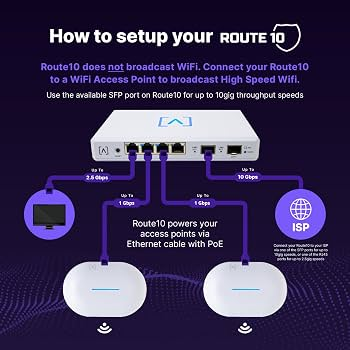
Let’s start with the Route10 router
The Route10 becomes the part of the home network that talks to the ISP. It is a router with many features, such as DHCP, firewalling, and the like.
The Router10 hardware provides four 2.5 GbE RJ45 ports and two 10 GbE SFP+ ports. Two RJ45 ports also provide PoE+, which can power access points in a small deployment without a separate PoE switch. The router supports multiple WAN connections, VLANs, WireGuard, IPsec, IDS/IPS, and CAKE traffic shaping. Alta Labs Route10 datasheet
For this design, one SFP+ port can face a 10-gigabit Internet service or upstream handoff. The other can provide a 10-gigabit connection to an S24-PoE or another switch with an SFP+ uplink. If the ISP doesn’t support 10 gig, you can simply set the port to 1 gig.
Connect things to ports
The switch decision should start with the number of hardwired devices you need today, with an eye on future growth. Access points, cameras, media servers, and anything else that should not depend on Wi-Fi. Most typical home deployments can get by with 24- or 16-port switches. I have anS24 with my cameras, access points, and a few hard-wired devices.
Alta offers several practical choices:
| S8-PoE | 8 × 1G | 4 | 60W | 1G Ethernet |
| S16-PoE | 16 × 1G | 8 | 120W | 2 × 1G SFP |
| S24-PoE | 24 × 1G | 16 | 240W | 2 × 10G SFP+ |
| S48-APOE | 32 × 1G and 16 × 2.5G | 48 | 740W | 4 × 10G SFP+ |
The S8-PoE fits a small home with one or two access points. The S16-PoE provides more ports, but its SFP uplinks stop at 1 Gbps. The S24-PoE makes more sense when the Route10 will connect to a NAS, server, or multi-gigabit Internet service because it supports a 10-gigabit SFP+ uplink. Alta Labs switch specifications
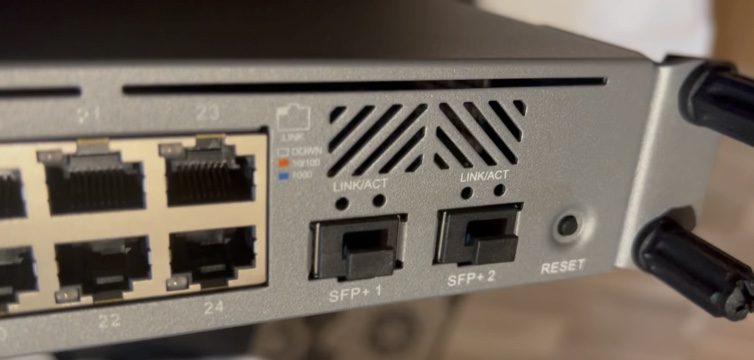
Most Alta switch access ports are gigabit. That does not hurt normal home traffic, but it can cap a newer WIFI7 multi-gigabit access point at 1 Gbps. The S48-APOE adds sixteen 2.5 GbE ports, though its size and 740-watt PoE budget place it closer to a large home or lab deployment. S48-APOE datasheet
Access Points for Coverage
You can place access points around the house to extend coverage. A ceiling-mounted AP near the center of each floor will usually perform better than a high-power radio sitting at one end of your home. As with all wireless installs its about location. My home is a 3-story A-Frame. I have an access point on each floor to ensure the max modulation for devices connecting.
From the Alta product line you have the AP6 and the AP6-Pro. Alta is starting to ship their Wifi7 Access Points as I write this. The AP6-Pro adds a 4×4 radio on 5 GHz and is ideal for areas with more clients. Heavy users would enjoy having 5 GHz for gaming devices and streaming boxes that support 5ghz. Both use PoE, so each AP needs only one Ethernet cable. It mounts on a wall or junction box and includes PoE passthrough for another device. An AP6-Pro-Outdoor can cover a patio, detached garage, or yard without trying to force an indoor AP through an exterior wall.
AP count matters less than placement. Two access points operating at sensible power levels often beat one AP running at maximum power because phones and IoT devices still have to transmit back to the access point. These deviices have smaller antennas so they can’t wander as far from an AP.
Use wired connections where you can
Every access point should connect to the Alta switch with Ethernet when possible. Wired backhaul keeps client traffic off the wireless channels used for access. It also prevents an AP at the far end of the house from depending on another weak wireless link.
Mesh can solve a location where Ethernet cannot be installed. It should remain the exception. A mesh node must receive a usable signal before it can provide a usable signal to clients. the places where mesh is usable almost always block the signal. Things like metal buildings, think rebar-laced concrete walls as just a few examples.
Build Separate Home Networks
A home network now contains devices with different access requirements. A work computer may need access to printers and a NAS. A thermostat needs Internet access but usually has no reason to reach the work computer.
A simple VLAN plan could look like this:
| 10 | Devices (phones, gaming,etc) | 192.168.10.0/24 |
| 20 | IoT devices | 192.168.20.0/24 |
| 30 | Security cameras | 192.168.30.0/24 |
| 40 | Guests | 192.168.40.0/24 |
The Route10 creates the VLAN interfaces and DHCP scopes. Firewall rules control which networks can communicate. Alta switch ports then carry the required VLANs to each access point. Alta VLAN configuration guide
Cameras can stay isolated from the Internet while still reaching a local recorder. Guest devices can reach the Internet without seeing printers or file servers. IoT devices can be blocked from initiating connections toward the trusted VLAN.
AltaPass to Simplify Wi-Fi
AltaPass can place clients into different network policies based on the password they use. The house can keep one visible SSID while using one password for trusted devices and another for IoT equipment.
Each password can map to a VLAN or network type. It can also receive its own speed limit and filtering policy. This reduces the number of SSIDs transmitted by every access point while still separating traffic. AltaPass configuration guide
I would still consider a separate guest SSID because our brains are trained to look for guest networks.. AltaPass becomes more useful for devices such as televisions, thermostats, and smart speakers that should share a familiar SSID name but land on an isolated network. It’s a break from the norm but works well.
A Practical Home Build
A medium-sized home could use this hardware:
- One Route10 connected to the ISP
- One S24-PoE in a small rack or structured wiring panel
- Two AP6-Pro access points for the main living areas
- One AP6W for an office or weak room
- One AP6-Pro-Outdoor for the patio or detached garage
https://j2sw.com
https://startawisp.info
https://indycolo.net
#packetsdownrange #routethelight
Discover more from Justin Wilson (j2sw)
Subscribe to get the latest posts sent to your email.