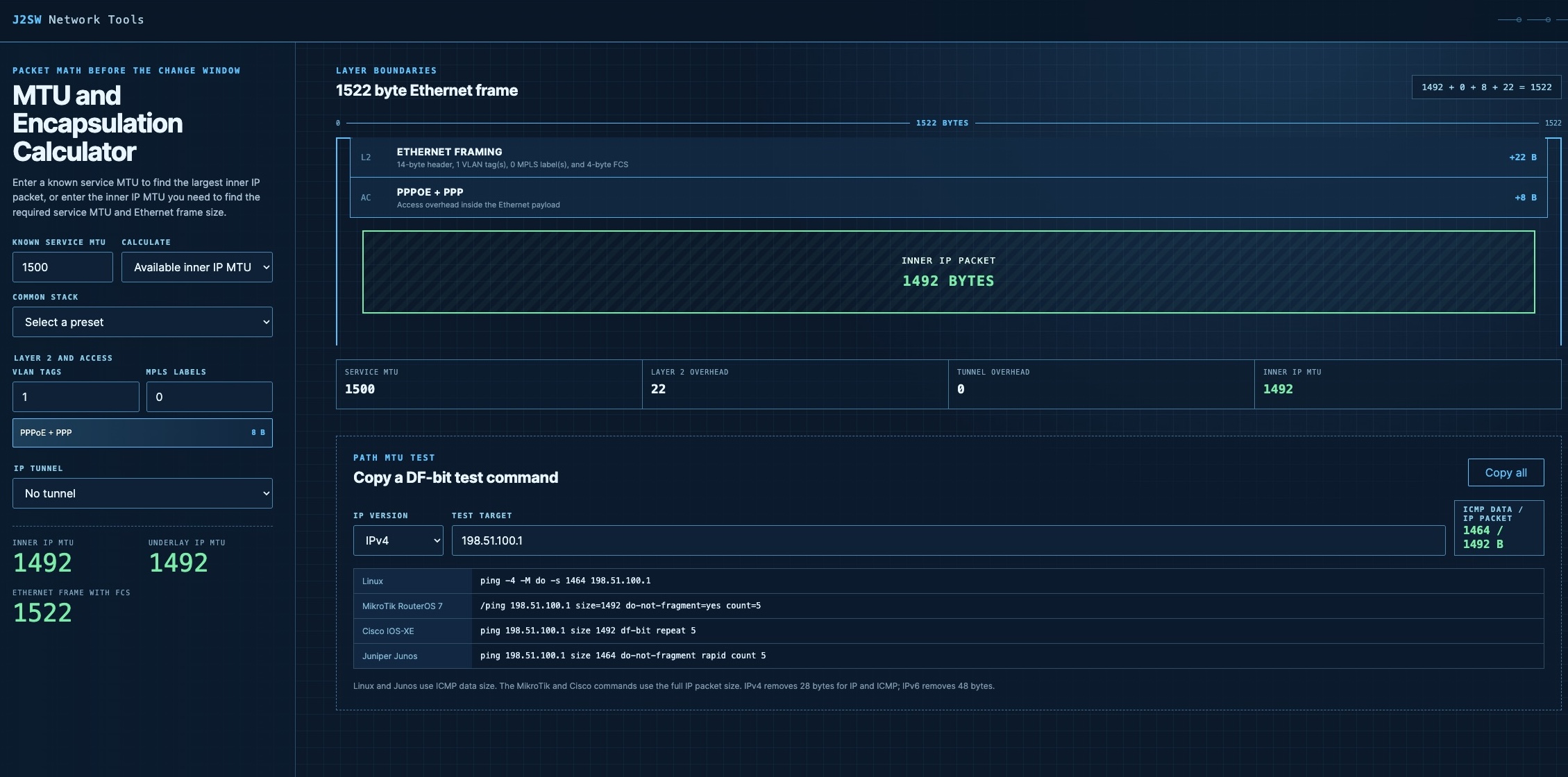
Ever wondered what the effects of different combinations of PPPoE, GRE, and others have on the MTU of a packet? I am excited to announce the first of many J2 Network tools: the J2SW MTU and Encapsulation Calculator. You select the service MTU and the encapsulation used on the path. The calculator then works out the inner IP MTU and the required underlay MTU. Something to make a network admins life easier.
Using the Calculator
Start with the MTU provided by the underlay or access service. Add the encapsulation used on the actual path, including the correct VLAN and MPLS counts. The result will show how much space remains for the inner IP packet.
The other calculation mode starts with the inner IP MTU you want to carry. It calculates the underlay MTU required to transport that packet without fragmentation. The Ethernet frame result then tells you how large the complete frame becomes after Layer 2 headers and tags are added.
Try the calculator here:
J2SW MTU and Encapsulation Calculator
IP MTU and Ethernet Frame Size Are Different
A VLAN tag adds four bytes to the Ethernet frame. It does not reduce a 1500-byte IP MTU to 1496 bytes when the link supports tagged Ethernet frames. QinQ adds another tag, while MPLS adds four bytes for each label.
The calculator keeps those Layer 2 bytes separate from the IP MTU. A 1500-byte IP packet uses a 1518-byte untagged Ethernet frame when the FCS is included. Add one VLAN tag and the frame becomes 1522 bytes, but the IP packet remains 1500 bytes.
That separation matters when checking whether a switch port or transport service can carry the complete frame. It also prevents Layer 2 overhead from being subtracted from the IP packet when it should only increase the frame size.
Calculating Encapsulation Overhead
PPPoE consumes eight bytes inside the Ethernet payload. A service with a 1500-byte MTU therefore carries an inner IP MTU of 1492 unless the access network supports a larger service MTU.
Tunnels add another IP packet around the original packet. GRE over IPv4 normally consumes 24 bytes, leaving a 1476-byte inner packet on a 1500-byte underlay. VXLAN over IPv4 consumes 50 bytes between the outer Ethernet frame and the inner Ethernet frame.
The calculator supports VLAN tags and MPLS label stacks without treating them as tunnel overhead. Counters let you enter the actual number of tags or labels instead of forcing the packet into a fixed preset.
Handling IPsec Overhead
IPsec overhead depends on more than whether ESP is enabled. Tunnel mode adds a new outer IP header, while transport mode protects the payload of the existing packet. NAT-T adds an eight-byte UDP header.
Cipher selection also affects the result. AES-GCM and AES-CBC use different IV and authentication fields. AES-CBC padding changes with the protected packet length, so a fixed 52-byte estimate can produce the wrong MTU near a block boundary.
The IPsec section lets you select the mode and outer IP version. You can also set NAT-T and the cipher details. The result lists the overhead used in the calculation instead of hiding it behind one fixed number.
Generating MTU Test Commands
Once the packet size is known, it still needs to be tested across the path. Linux and Junos commonly expect the ICMP data size in their ping commands. For IPv4 with a 1500-byte MTU, that value is 1472 after removing the 20-byte IP header and eight-byte ICMP header.
MikroTik RouterOS and Cisco IOS-XE use the full IP packet size in the commands generated by the calculator. A 1500-byte IPv4 test therefore uses size=1500 on MikroTik instead of 1472. The Cisco IPv6 command uses its separate IPv6 syntax and does not add the IPv4 DF-bit option.
The calculator generates commands for Linux and MikroTik. It also covers Cisco IOS-XE and Junos. Each command can be copied from the results after the MTU and IP version are selected.
j2networks family of siteshttps://j2sw.com
https://startawisp.info
https://indycolo.net
#packetsdownrange #routethelight
Discover more from Justin Wilson (j2sw)
Subscribe to get the latest posts sent to your email.