3 Mintue read time
Justin Wilson PacketsDownRange
A common problem I run into when diagnosing route issues is traffic not going across the path it’s supposed to. An established BGP session only means the routers successfully exchanged routes. It says nothing about which route your router actually installed in the forwarding table. Let’s get into some common things to look at if your traffic is mismatched or coming and going to the wrong places.
Look at the routing table first
Suppose your router learns a prefix for a content provider from both your transit provider and an Internet exchange. BGP has to pick one of them. Once it makes that decision, every packet to that prefix follows the selected path until something changes.
For example:
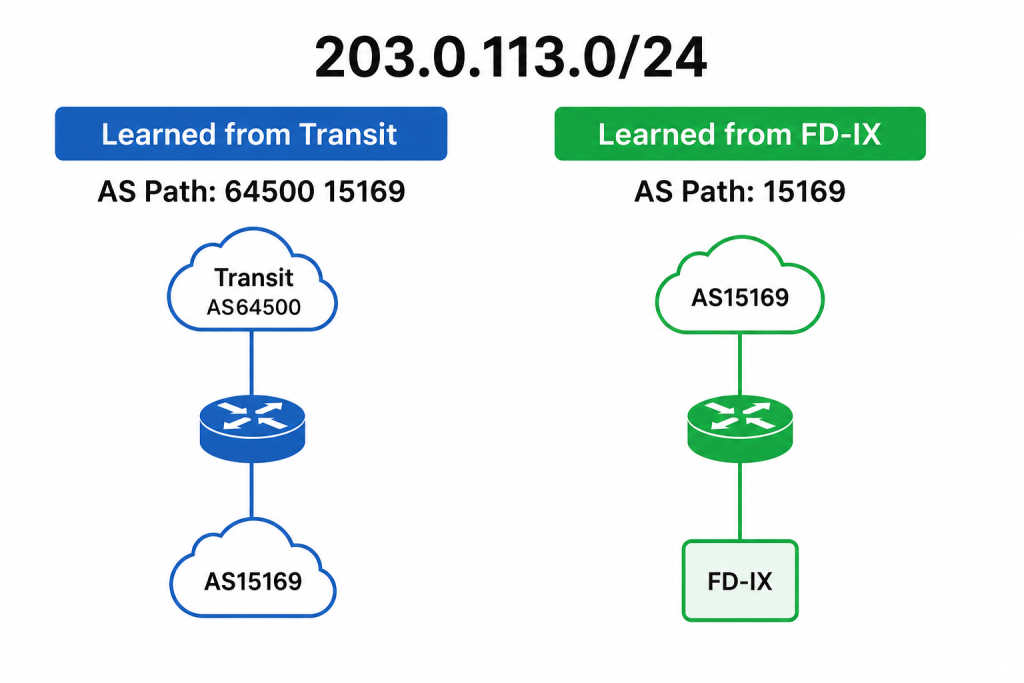
At first glance, the FD-IX learned route looks like the obvious winner because the AS path is shorter. The AS path is not the first thing BGP evaluates. If you want to learn the entire decision making tree of BGP you can go to this article.
Local Preference
Local Preference is one of the core BGP attributes in my book. Many ISPs intentionally assign a higher Local Preference to customer routes than to peers, and a higher Local Preference to peers than to transit. That gives the router a consistent policy for choosing paths. If those values are wrong, traffic follows the policy instead of the path you expected.
Imagine your router learns these two routes.
Transit
Local Preference: 200

FD-IX Peer
Local Preference: 150
The router never needs to compare AS paths because Local Preference says the higher number wins. Every packet continues across transit even though the peering session is healthy. I’ve seen engineers spend hours troubleshooting an Internet exchange when the answer was local pref. If you adjust the local pref on the IX peer to be high, the router will now choose that path. Default settings can also influence this. On most routers, the default local pref is 100. If that is never changed, it can cause issues.
The Other Networks Make Decisions Too
Your router chooses how outbound traffic leaves your network. The remote network makes the same decision for return traffic. Those two decisions do not have to match. I always say your view of the Internet may not be the same as the view of whoever you are connecting to.
You may send packets across the Internet exchange while the return traffic arrives through transit. Applications continue working because IP is bidirectional, but traceroutes from each direction can look completely different. When troubleshooting peering, I always check both directions before assuming there is a problem.
Communities
Many networks publish BGP communities that control how they advertise your routes.
A single community might tell them:
- Do not advertise this route at a particular exchange.
- Prepend the route toward certain peers.
- Advertise only within one geographic region.
If the wrong community is attached to your advertisements, the remote network may intentionally avoid the path you expected.
Route Servers at an IX
If you peer through a route server, remember that the route server is not forwarding traffic. It distributes routing information between participants. Route filtering, RPKI validation, maximum prefix limits, or import policies can all affect which prefixes your router actually learns. A session to the route server can remain established while certain routes never appear in your routing table.
BGP Troubleshooting 101
When traffic ignores a peer, I usually work through a simple checklist.
- Does the prefix exist in the routing table?
- Which next hop did BGP install?
- What Local Preference does the winning route have?
- Is there a more-specific route from another source?
- Does the AS path match what you expected?
- Are any BGP communities changing the routing policy?
https://j2sw.com
https://startawisp.info
https://indycolo.net
#packetsdownrange #routethelight
Discover more from Justin Wilson (j2sw)
Subscribe to get the latest posts sent to your email.