A browser does not always need the whole file at once. Sometimes it only needs a slice of the file. That slice might be the next part of a video or a chunk of a large object sitting behind a CDN. When that happens, the client can request a byte range instead of requesting the entire file again. This is where HTTP 206 can help. it’s not an error but a mechanism for dealing with large files.
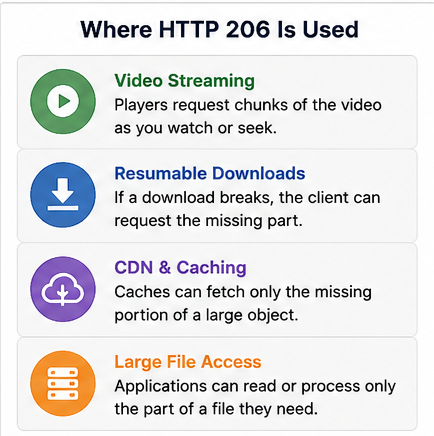
Video playback is one of the easiest places we see HTTP 206 in use. A video player may not pull the whole file before playback starts. It asks for a chunk, starts playing, and then asks for later chunks as the viewer keeps watching. If the viewer jumps forward, the player can request a different byte range instead of downloading everything between the old position and the new one.
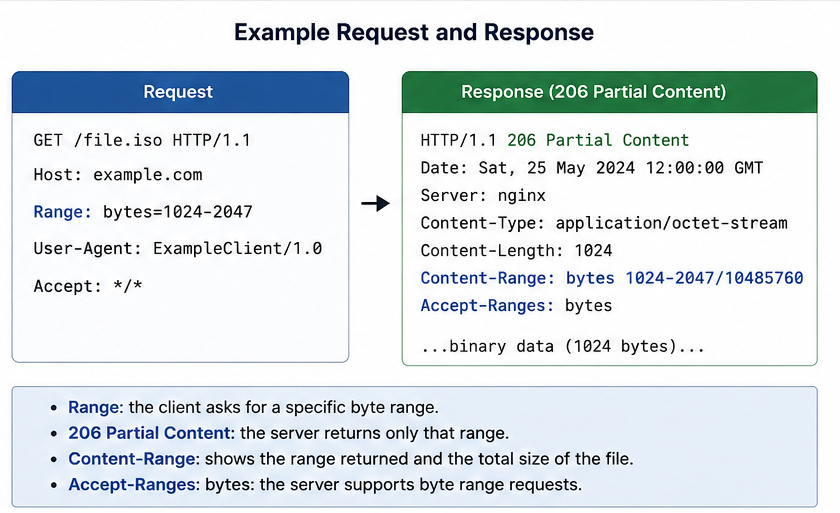
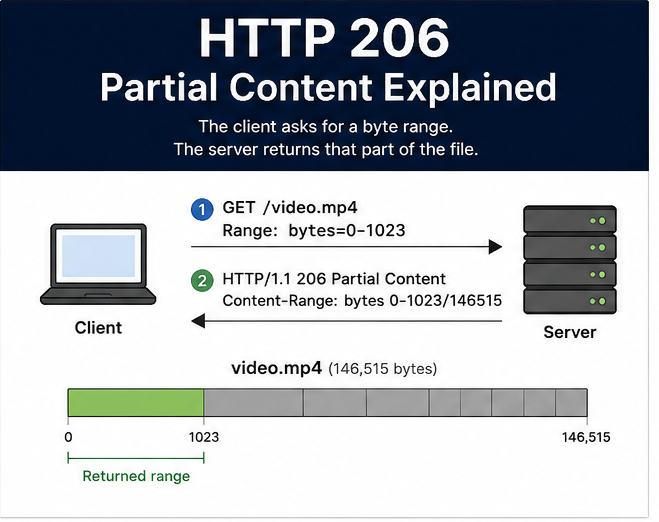
HTTP 206 means the server agreed to send only part of the resource. The client sends a Range header with the request. The server answers with 206 Partial Content and sends the requested section of the file. The response should also include Content-Range, which tells the client what part of the file it received and how large the full file is.
For the geeks out there, here is a dry explanation of what is going on. A simple request might ask for bytes 0-1023 of a file. That means the client wants the first 1024 bytes of that file. The server can answer with a Content-Range value like bytes 0-1023/146515. That tells the client it received bytes 0 through 1023 from a file that is 146,515 bytes long.
Downloads can use the same behavior. If a large file transfer breaks halfway through, the client may already have part of the file on disk. A good client can ask the server for the missing range instead of starting over. That saves time for the user and reduces server-side bandwidth usage. This is very helpful on cellular or slower connections. I don’t know how many times I have had to restart a file transfer over a hotspot connection because the signal dropped.
Caches and CDNs also care about range behavior with their content. A cache may have part of a large object and still need another section from the origin server. If the range handling is clean, the cache can fetch the missing part and serve the client without pulling the whole object again. If the origin handles ranges poorly, the cache may request more data than needed or fail to satisfy the client request.
HTTP 206 is not an error, even though “Partial Content” can look odd in a browser console. It just means the server sent the part of the file the client asked for. The better thing to check is whether the request had a Range header and whether the response sent back the byte range the client expected.
Range requests get ugly when the headers and the file do not agree. If the server sends the wrong Content-Range, the client may not know what part of the file it actually received. Video seeking can break when the server claims range support but cannot return clean byte slices. A proxy can make this harder by stripping or mishandling the Range header, which makes the origin server look broken even when it answered the request correctly.
j2networks family of siteshttps://j2sw.com
https://startawisp.info
https://indycolo.net
#packetsdownrange #routethelight
Discover more from Justin Wilson (j2sw)
Subscribe to get the latest posts sent to your email.