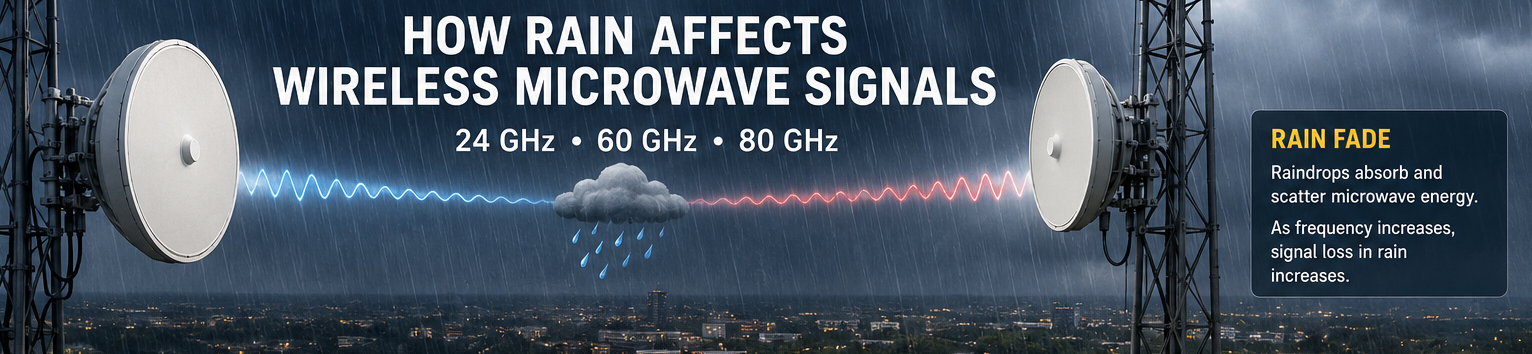
Wireless microwave links can move large amounts of traffic without installing fiber. Internet providers, enterprises, utilities, and data centers use them to connect buildings, towers, and network sites. The packets do not care whether they travel through glass or through the air. The challenge is that air changes. Rain, humidity, and atmospheric absorption all affect microwave signals as frequencies increase.
Rain usually illustrates the difference between a low-frequency microwave shot and a higher one. I have seen lower-frequency links keep passing traffic while higher-frequency links start losing modulation during the same storm. Once you get into 24, 60, and 80 GHz, there’s less room for error. Distance, fade margin, and real usable bandwidth all come down to how much signal is still hitting the receiver when rain is falling.
What Is Rain Fade?
Rain fade is the reduction in signal strength caused by precipitation between two microwave radios. Every raindrop absorbs and scatters a small amount of RF energy. As rain intensity increases, more signal energy is lost before it reaches the receiving radio. The rain almost becomes “noise” for the RF signal.
Lower-frequency microwave bands can travel many miles with relatively little attenuation from rain. Higher-frequency bands trade distance for capacity. They can deliver multi-gigabit throughput, but they are much more sensitive to weather.
A microwave radio does not usually fail all at once. Signal levels begin to drop as rain approaches. Error correction starts working harder. Modulation rates may step down automatically. Throughput decreases. If attenuation exceeds the available fade margin, the link eventually drops. A good microwave radio has a threshold that can be set so the link drops before it runs out of bandwidth.
Fade Margin
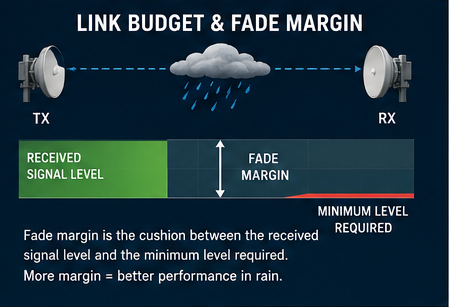
I look at the fade margin as the buffer the link has before the receiver gets into trouble. If the radio is 25 dB above threshold, a normal rain event may not do much. A hard rain starts eating that number down. When the margin is gone, the radio backs off modulation. As we know, a decrease in modulation means a decrease in available bandwidth.
Rain does not have to knock the link down all at once. On a healthy microwave path, the first sign may be a lower receive level on the radio graph. If the radio supports adaptive modulation, it may drop from a higher modulation rate to a lower one so the link can stay up. The customer may still pass traffic, but the available bandwidth is lower.
A link with very little fade margin has no room to absorb weather. It may look fine during a clear install, then start dropping packets during the first hard rain. That is why a clear-day signal reading by itself does not prove the path is built well.
24 GHz Microwave Links
I like 24 GHz when the shot needs more capacity but still has to cover real distance. It is not as forgiving as 6 or 11 GHz, but it gives you more room than the higher millimeter-wave bands. 24 GHz antennas are typically smaller than 6 GHz and 11 GHz antennas as well. A few miles can be practical if the receive level is healthy and the dishes are aligned well. Normal rain may only show as a small dip on the graph. A heavy thunderstorm is where you find out how much margin the path really had.
24 GHz is kind of the sweet spot between licensed and e-band if you need long distance, but still need good throughput.
Typical characteristics of 24GHz include:
- Multi-mile link distances
- Moderate rain attenuation
- Licensed spectrum availability
- Good balance between capacity and distance
60 GHz Wireless Links
60 GHz behaves very differently from most microwave bands. The atmosphere itself absorbs energy around this frequency. Oxygen molecules react with signals near 60 GHz, introducing significant attenuation even when the weather is clear.
The short reach of 60 GHz is not always a problem. In a tight rooftop build, it can be useful because the signal fades out before it gets too far past the other end. That helps with reuse. You still have to build the path right, but the band does not spray RF across the whole market as low frequencies can. Rings of 60 GHz, in urban settings, can be built without much interference.
When a storm moves through the link, the receive level can drop more quickly than other frequencies due to the oxygen absorption. A link that looked fine on a clear day may start stepping down once the rain gets heavy. That is why most 60 GHz shots stay short.
Typical characteristics include:
- Strong oxygen absorption
- Short-range deployments
- Multi-gigabit throughput
- Limited interference footprint
- Heavy sensitivity to rain and weather conditions
Many rooftop and building-to-building links use 60 GHz because distances are measured in hundreds of feet or a few thousand feet rather than multiple miles.
80 GHz and E-Band Links
An E-band radio can push multiple gigabits across a rooftop or tower path without waiting on fiber construction. That makes it useful for backhaul, data center extensions, and dense metro links where the distance is controlled. The tradeoff is rain margin. Something interesting happens at 80 GHz compared to 60 GHz. The 80GHz link will typically remain alive for several reasons.
The tradeoff is rain sensitivity. At 80 GHz, heavy precipitation can significantly reduce signal strength along the path. Link budgets must account for regional rainfall rates rather than average weather conditions. A path that works during normal rain may fail during a severe thunderstorm if there is insufficient fade margin.
Most E-band designs keep the hops short. In an urban build, that may mean splitting a long path into two shorter ones. It may mean another pair of radios, but the link is more likely to stay up when heavy rain crosses the path. These radios are typically deployed for bandwidth, not distance.
Typical characteristics include:
- Extremely high throughput
- Shorter path distances
- Significant rain attenuation
- Availability is highly dependent on fade margin calculations.
Adaptive Modulation
Most modern microwave radios support adaptive modulation. The radio automatically lowers modulation rates as signal quality decreases. When rain gets into the path, the first hit is usually modulation. The radio backs off to keep the link alive. Traffic still passes, but the speed test looks worse long before the circuit actually drops.
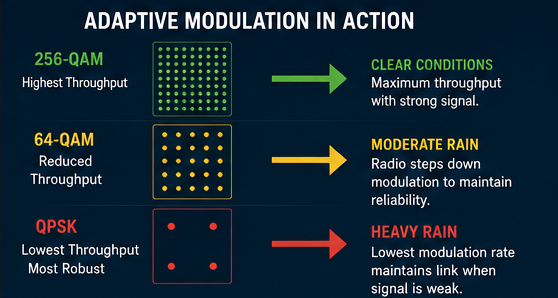
This is often visible in network monitoring systems. Signal levels decline first. Throughput begins falling. Packet loss remains low until the radio reaches its minimum operating threshold.
Designing for Weather
A 3-mile 80 GHz path in Phoenix may run for months without seeing significant rain attenuation. That same path length in central Florida can lose enough signal during a summer thunderstorm. Link budgets should account for the worst expected conditions rather than average weather. A path that looks excellent on a sunny afternoon may not survive a summer thunderstorm if it does not have enough fade margin.
The packets still have to move. Whether the traffic is crossing a carrier backhaul, connecting a tower, or linking two data centers, rain becomes part of the network design once frequencies climb into the 24 GHz, 60 GHz, and 80 GHz ranges.
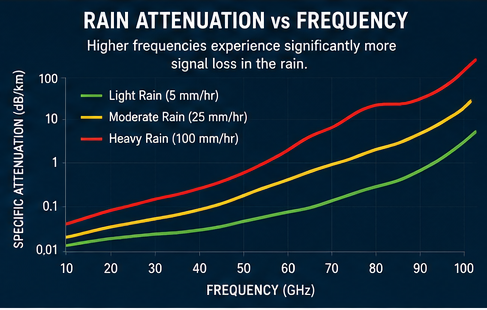
24 GHz vs 60 GHz vs 80 GHz
| Frequency | Typical Distance | Rain Impact | Capacity |
| 24 GHz | Several miles | Moderate | High |
| 60 GHz | Short range | High | Very High |
| 80 GHz | Short to medium range | Very High | Extremely High |
If Distance is a concern, I would usually look at 24 GHz first. It gives you more reach and fades in the rain more slowly. 24 GHz is a nice compromise between price and performance. For short rooftop paths, 60 GHz can work well because the signal stays contained while still having respectable bandwidth. When the job needs the most throughput, 80 GHz can move a lot of traffic, but the path has to be short enough and clean enough to survive a hard rain.
j2networks family of siteshttps://j2sw.com
https://startawisp.info
https://indycolo.net
#packetsdownrange #routethelight
Discover more from Justin Wilson (j2sw)
Subscribe to get the latest posts sent to your email.