
In this article
A data center fabric is the network that connects servers, storage systems, firewalls, routers, and Internet connections inside a data center. When a server sends a packet to another server, the fabric carries it across the building. The switches within the fabric make forwarding decisions and determine which path traffic takes. It’s not necessarily the fabric the data center uses. It’s what you use inside the data center yourself.
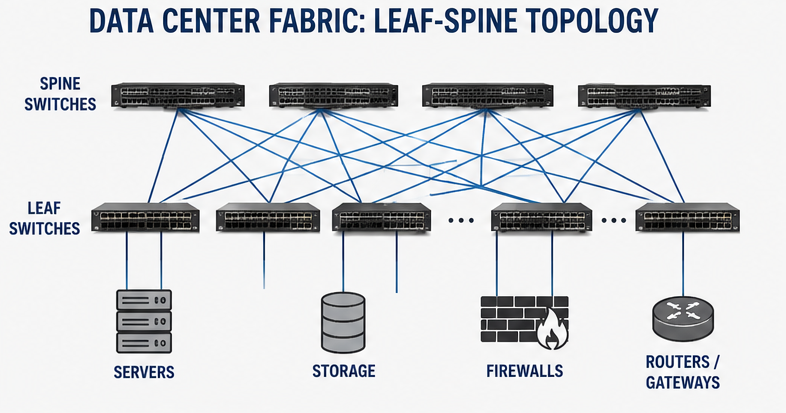
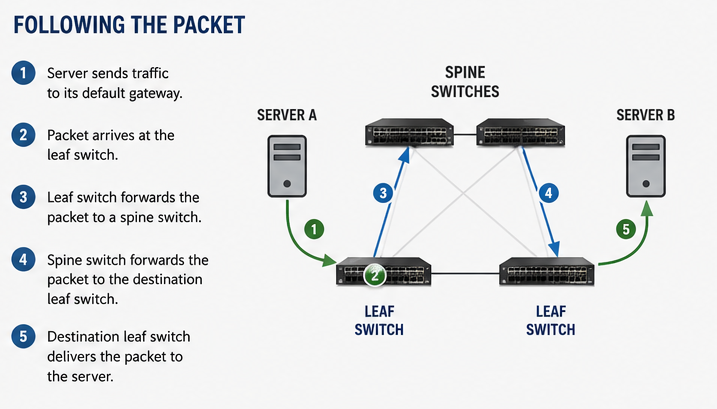
Most modern fabrics use a leaf-and-spine design. Every server connects to a leaf switch. Every leaf switch connects to every spine switch. The packet enters a leaf switch, crosses a spine switch, and arrives at another leaf switch before reaching its destination. Let’s get into what all this means at a high level.
Leaf Switches
Leaf switches sit at the edge of the fabric. Servers, storage arrays, hypervisors, firewalls, and routers connect directly to them. When traffic enters the network, the leaf switch is usually the first device that processes it. A leaf switch is also referred to as a Top-of-Rack (ToR) switch.
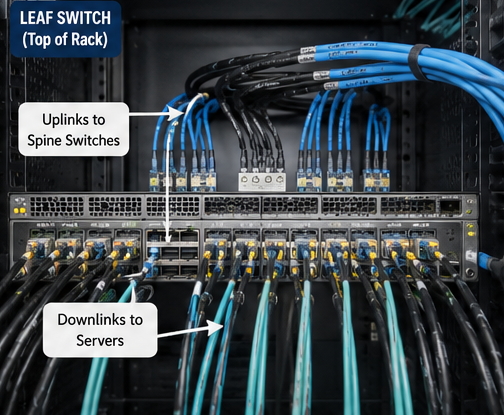
A rack full of servers may connect to a pair of leaf switches using 10G, 25G, 100G, or faster links. Those server-facing ports are commonly referred to as downlinks. Connections to the spine layer are commonly called uplinks.
A rack with forty-eight servers and dual network connections already consumes ninety-six switch ports before any storage or management networks are considered.
Spine Switches
Spine switches connect leaf switches together. They do not normally connect directly to servers. Their job is to move traffic across the fabric. Every leaf switch connects to every spine switch. If a fabric contains four spine switches, each leaf maintains four separate paths into the network. Traffic can use any of those paths.
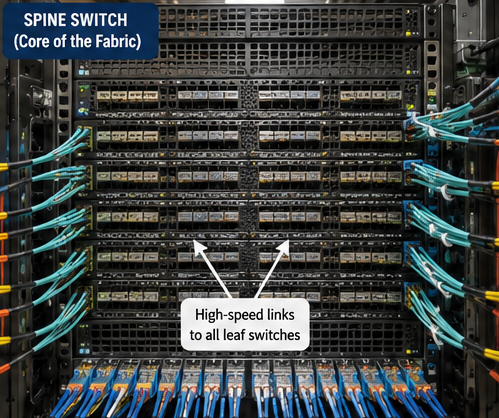
This is where bandwidth starts adding up. Four 100G uplinks from a leaf switch provide 400 Gbps of capacity inside the fabric. Large deployments often use 400G and 800G interfaces between switches.
Following the Packet
The easiest way to understand a fabric is to follow a packet. A server sends traffic toward its default gateway. The packet arrives at the leaf switch. The leaf switch selects one of its available spine paths and forwards the packet. The spine switch examines the destination and forwards the packet toward the correct leaf switch. That leaf switch delivers the packet to the destination server. Three switch hops. Done.
Equal Cost Multipath Routing
Most fabrics use Equal Cost Multipath routing, usually shortened to ECMP. The fabric sees multiple paths with the same routing cost and distributes traffic across them. One flow may use Spine 1. Another flow may use Spine 3. Thousands of flows spread across the available links.
When operators examine interface graphs, they typically see traffic distributed across multiple uplinks rather than a single connection carrying most of the load. That allows the fabric to use available bandwidth more efficiently. This also increases redundancy should one link fail or need to be taken out of service.
VXLAN and EVPN
Many modern fabrics use VXLAN and EVPN to transport Layer 2 networks across a routed fabric. VLANs no longer need to exist only on adjacent switches.
A server in one rack can communicate with a server in another rack while remaining in the same Layer 2 network. Traffic is encapsulated in IP packets as it crosses the fabric. The switches remove the encapsulation before delivering the traffic to the destination device. Large environments may contain thousands of VLANs. VXLAN allows those networks to span the data center without extending traditional Layer 2 domains everywhere.
Fabric Bandwidth
A leaf can have more server ports than the uplink capacity. Forty-eight 25G ports equal 1.2 Tbps facing the servers. If that leaf has only four 100G uplinks, the spine-side tops out at 400G. That works until too many servers talk at once. Then the uplinks fill first.
Fiber Optics and Cabling
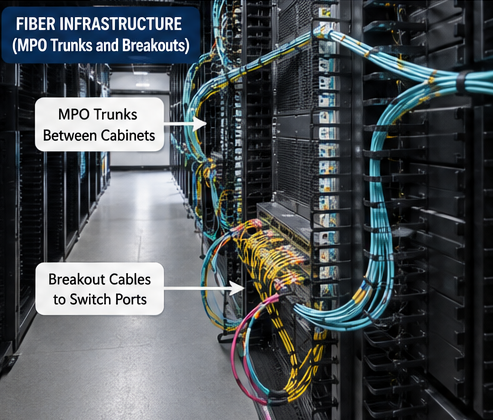
Leaf switches connect to spine switches using optical transceivers/ These form fiber trunks. A medium-sized deployment can consume hundreds of fiber strands. Large deployments may use thousands. MPO trunks feed the cabinets. Breakout cables split those trunks into switch ports. Even modern servers have fiber ports instead of copper Ethernet. A bumped jumper may not drop the link right away. Sometimes the only clue is lower Rx power or a CRC counter that keeps climbing..
AI and High-Density Fabrics
AI clusters push fabrics harder than most enterprise environments. Hundreds of GPUs exchange data continuously during training jobs. The traffic often stays within the fabric rather than heading toward the Internet. We have written several blog posts on the blog.fd-ix.ai on the various AI fabrics.
An AI cluster may consume hundreds of 100G ports or large numbers of 400G ports. A failed transceiver removes bandwidth from the cluster until it is replaced. One congested path can slow an entire training job while other servers wait for synchronization traffic to arrive.
What Network Engineers Monitor
The fabric has to be watched at the port level. Interface graphs show which uplinks are running hot. Optical levels indicate when a fiber path is weakening. CRC errors usually point to a bad optic, a dirty fiber, or a damaged patch cable. Packet drops indicate that the switch is running out of queue space.
Final Thoughts
A data center fabric is simply a high-speed network that moves packets between devices within a data center. Servers connect to leaf switches. Leaf switches connect to spine switches. The packet follows the available paths until it reaches its destination.
The scale is what surprises people. Hundreds of switches, thousands of fiber connections, and terabits of traffic all work together to move packets from one port to another.
j2networks family of siteshttps://j2sw.com
https://startawisp.info
https://indycolo.net
#packetsdownrange #routethelight
Discover more from Justin Wilson (j2sw)
Subscribe to get the latest posts sent to your email.